01 · Talk it
You rambled for 12 seconds. Kloven turned it into an email.
Before: what you said
Kloven
After: what gets sent
Voice it, screenshot it, share it, or type it rough. Ten seconds later you have something worth sending.
Free to try · No credit card · Nothing sends without you

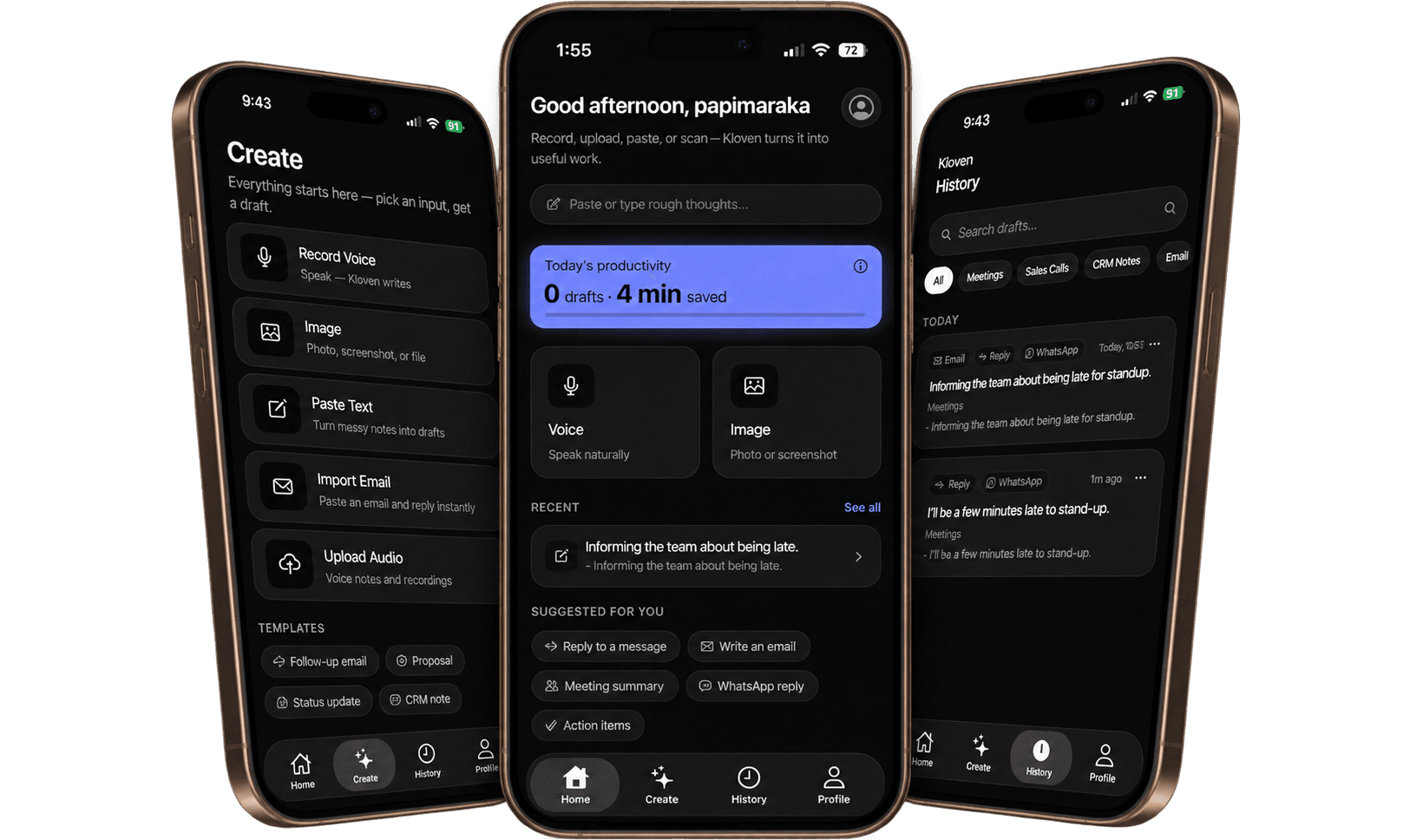
See it work
Pick the way work lands on you. Kloven turns it into something you can actually send.
Swipe to compare
Capture once. Send confidently.
You can. Most people do. Kloven exists for the moments when you just need it done, not explained, not prompted, not pasted into three windows.
To do the same thing in ChatGPT:
8 steps vs. 4. And 3 of yours are done before you even type.
Kloven
It’s not better AI. It’s less workflow.
Everything starts in one place. Every draft comes out in the format you need (email, WhatsApp, Teams, Slack, or SMS), detected from what you say, switchable in one tap. No reformatting. No re-prompting.
Write once. Tap to convert. The same thought becomes an email, a WhatsApp, a Teams message, or an SMS, formatted correctly for each. Same words. Right shape.
One-tap conversion between Email, Teams, WhatsApp, SMS, and Slack.
Talk naturally. Your words appear on screen as you speak. Then you see the transcript first and choose: polish it as-is, or draft a message from it. Or upload a voice note.
Live on-screen transcription, transcript-first review, plus MP3, M4A, and WAV uploads.
Screenshot a message, drop in a PDF, snap it in-app, share it from any app, or tap the Screenshot key in the Kloven keyboard. Kloven reads it and drafts a reply. No retyping what’s already on your screen.
In-app camera, Share sheet, keyboard Screenshot key, OCR, PDFs. Reply, summary, and next steps from one capture.
One-tap modes: De-escalate, Polite decline, Executive brief, Client update. Kloven shapes the tone so you don’t have to. Turn on Keep my words and it fixes grammar and fillers only, so your wording stays yours. Your signature is saved, never “[Your Name]” at the end.
Quick modes, Keep my words, tone control, action items, and subject line options.
Two steps are yours. One is ours.
Say it on the walk back from the meeting. Paste the thread. Screenshot the message.
Tone matched. Format right. Ready to copy. No prompting, no editing.
Copy it into whatever app you’re already in, or insert it with the Kloven keyboard. Nothing leaves without you reviewing it first.
Pick your role. See exactly how Kloven handles the part you hate most.
Rough input
“Meeting finished. Need to tell Sarah we’re good on requirements but waiting on their security team.”
Ready to send
Hi Sarah, good news from today’s session: requirements are fully signed off on our side. The remaining dependency is your security team’s review, and I’ll follow up as soon as we hear back.
Every output is formatted for Email, Slack, Teams, WhatsApp, or SMS, ready to copy into the app you already use.
Voice-note the update on the walk back from the meeting instead of reconstructing it later.
The first rough version becomes the one you send. No second draft. No wondering if the tone is right.
Client email, internal Teams update, or WhatsApp reply from the same underlying thought.
No data sold. Not used to train AI models. Delete your account and everything goes. You’re not the product.
Every time. Leave the meeting, open a blank email, and spend the next fifteen minutes writing something I already knew.
The thought was done. The email wasn’t.
Kloven is the gap between those two things. Capture it once. Send it fast.
Papi, Founder of Kloven
No buzzwords. Just what actually happens to your data, and what doesn’t.
We do not sell your personal data or content to advertisers or data brokers.
Your content is processed to generate your output, not to train AI models.
Remove your account and data from inside the app or via our delete-account page.
Sign in with Apple, Google, or Email. Credentials are handled by the sign-in provider. We never see your password.
Cancel any time from your Apple ID settings. No email needed, no hoops to jump through.
Kloven writes. You decide. Nothing is sent to anyone until you hit send. Kloven only processes the text you give it, or, on the keyboard, the text you explicitly act on.
Free to try. No card required.
Pro is $14.99/month or $4.99/week after a 3-day free trial, shown in the App Store before purchase.
Kloven handles the version you actually send.
Free to try. Nothing sends without you.